Ajay Kumar Verma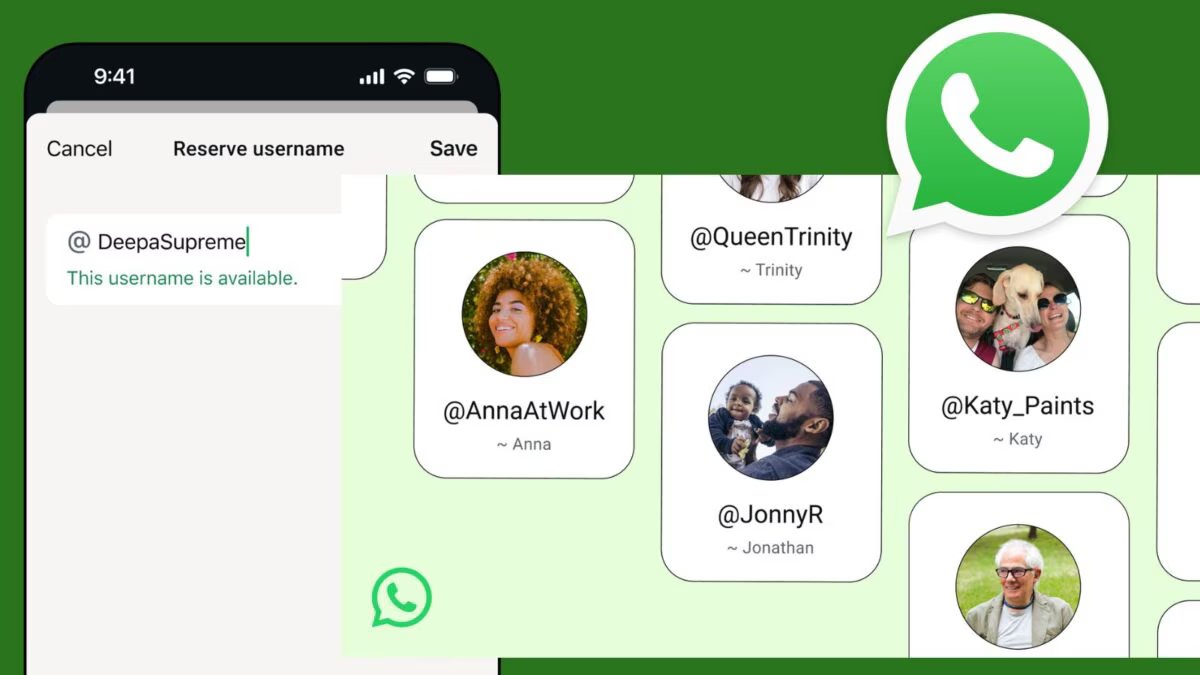

Last Updated:
With the new Username feature of WhatsApp, it will now be easy to chat and call without sharing the phone number. Learn how to create and change a username, its rules, limits, privacy settings and solutions to common problems.


Now you will be identified on WhatsApp with your username, know how to set a new handle
WhatsApp has recently launched the Usernames feature, which allows users to connect with others by hiding their phone number. Now you can message or call people through @username. This feature is very useful for increasing privacy and easy connectivity.
What are WhatsApp Usernames and how does it work? WhatsApp Username is a unique handle that starts with @, like @simrancutie. It works in place of your phone number. People can search and send messages to you by knowing your username, without saving your number.
How does it work?
- The username is public, but the phone number remains private.
- You can set the username in your profile.
- There is a limit on changing username (once in a while).
- Usernames can also create links to share with others.
WhatsApp Username Rules: Character Limit, Availability
There are some strict rules for WhatsApp usernames:
- Character Limit: Minimum 3 and maximum 25 characters.
- Allowed Characters: English letters (az), numbers (0-9) and underscores (_)
- Availability: Username must be unique. If someone else is using it then it will not be available.
- Restrictions: Cannot use WhatsApp official name (like WhatsApp, Support etc.).
- No offensive, incorrect or copyrighted names.
- Cannot find space.
- The @ sign does not have to be written in the username, it is visible only in the profile.
How to create and change WhatsApp Username?
- Open WhatsApp > go to Settings > Profile.
- Tap on the Username section.
- Type your preferred username.
- It will be checked whether it is available or not.
- Save.
Note: After changing the username, it cannot be changed again for some time.
Some common problems of WhatsApp username and how to fix them
- Username Already Taken
-Try a different username or add numbers/underscores to your name. - Invalid Characters Error
-Only use az, 0-9 and _. - Cannot Change Username
-If the username has changed recently, then wait for a few days. - Privacy Concerns
-Control who can search by going to Settings > Privacy > Username.
WhatsApp username feature provides both privacy and convenience. By following the right rules, you can create your own unique username and let others contact you easily. If you also want to set a username then follow the steps mentioned above. Be careful and choose a funny username.
About the Author

Afreen Afaq has started her career with Network 18 as a Tech Journalist, and has more than six years experience in ‘Mobile-Technology’ beat. She is a high-performing professional with an established and proven …read more
Discover more from News Link360
Subscribe to get the latest posts sent to your email.