Top Picks Across Budgets
Best Overall: Lenovo LOQ- All-round performance with RTX 4050, Intel Core i5-12450HX and great thermal management.
Best Budget Gaming Laptop: HP Victus – Reliable gaming and multitasking at a low price.
Best Performance: Dell G15 5530 – Great option for long gaming sessions with Intel Core i5-13450HX and better cooling.
Best Lightweight: MSI Thin 15 – Lightweight design, RTX graphics, and a great option for students.
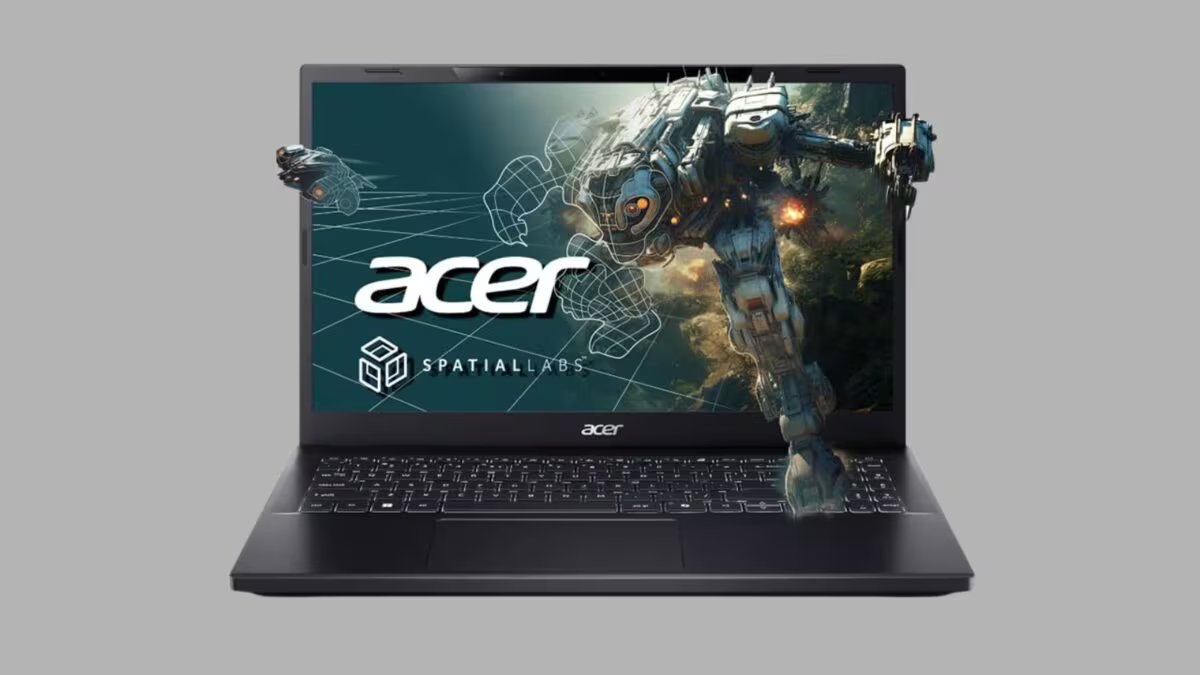
Best Creative Gaming Laptop: Acer Aspire 3D SpatialLabs Edition- RTX 2050, 4K display and a differentiated experience for creative workloads.
Compare all products
| category | product | First | Now | discount |
|---|---|---|---|---|
| Best Overall | Lenovo LOQ | ₹99,990 | ₹84,990 | 15% |
| Best Premium | ASUS Gaming V16 | ₹1,09,990 | ₹94,990 | 14% |
| Best Budget | HP Victus | ₹84,999 | ₹69,990 | 18% |
| Best Performance | Dell G15 5530 | ₹1,14,990 | ₹89,990 | 22% |
| Best Lightweight | MSI Thin 15 | ₹89,990 | ₹74,990 | 17% |
| Best Creative | Acer Aspire 3D SpatialLabs Edition | ₹1,50,999 | ₹79,999 | 47% |
Which One Should You Choose? (Which one is better to buy)
If your main focus is Competitive Gaming like Valorant, CS2 or Apex Legends, then a laptop with RTX 4050 GPU and 144Hz or higher refresh rate would be better.
If you do video editing, 3D designing or content creation along with gaming, then it will be beneficial to choose a model with a better display and more powerful processor. Whereas for college students or casual gamers, models like HP Victus and MSI Thin 15 provide better value.
Lenovo LOQ 2024 12th Gen Core i5
Buying Factors (What to look for while buying)
performance
While buying a gaming laptop, first look at the combination of processor and GPU. Processors like Intel Core i5-12450HX, i5-13420H and i5-13450HX deliver good performance in both multitasking and gaming.
graphic card
RTX 2050 is a good option for entry-level AAA gaming. Whereas RTX 3050 and especially RTX 4050 are considered to have better graphics, DLSS support and are more capable for future games.
ASUS Gaming V16 (2025)
display
It would be better to choose a Full HD IPS display with at least 144Hz refresh rate. If you also do photo or video editing, a panel with better color accuracy would be better. Models like the Acer Aspire 3D SpatialLabs offer a unique experience to creative users with their 4K display.
RAM and storage
Today, 16GB RAM and 512GB SSD is the most balanced configuration for gaming. Upgradable RAM and additional SSD slots remain beneficial for the future.
HP Smartchoice Victus
cooling system
The laptop gets constantly hot during gaming. Dual fans, large air vents and improved thermal design help maintain performance during long gaming sessions.
battery life
Battery backup in gaming laptops is less than that of normal laptops. For a better gaming experience, it is better to play with a charger.
Dell G Series Intel Core i5-13450HX, 13th Gen
build quality
Strong chassis, durable hinges and good quality keyboard extend the life of the laptop. If you take your laptop to college or office every day, then definitely check its weight.
connectivity
Wi-Fi 6, USB Type-C, HDMI, Ethernet Port and enough USB ports are considered good investments for the future.
Common Mistakes Buyers Make (People often make such mistakes while shopping)
Buying a laptop just by looking at the RGB keyboard. Focusing only on the processor instead of the GPU. Choosing a model with 8GB RAM. Ignoring the cooling system. Buying a gaming laptop with a 60Hz display. Not checking the upgrade option.
Essentials vs Good-to-Have Features
Must-Have Features
- NVIDIA RTX Graphics
- 16GB RAM
- 512GB SSD
- 144Hz Display
- Good Cooling System
- Wi-Fi 6
- Backlit Keyboard
If you get these features then it would be great
- RTX 4050 GPU
- MUX Switch
- AI Cooling
- RGB keyboard
- QHD or 4K Display
- Thunderbolt / USB4
- Advanced Thermal Modes
What Your Budget Gets You
₹65,000- ₹75,000: RTX 2050 or RTX 3050, 16GB RAM, 512GB SSD, and entry-level AAA gaming.
₹75,000- ₹90,000: Better processor, RTX 3050/4050, 144Hz display and smoother gaming experience.
₹90,000- ₹1,00,000: RTX 4050, powerful cooling, better display and performance even for content creation.
Verdict (Our Verdict)
If you want the best balance between price and performance, Lenovo LOQ is one of the strongest options. ASUS Gaming V16 and Dell G15 5530 are also great options for better gaming and the latest RTX 4050 GPU. Buyers with limited budget can choose HP Victus or MSI Thin 15. On the other hand, if you want 3D designing, visual content or high-resolution display along with gaming, then Acer Aspire 3D SpatialLabs Edition can prove to be a different and interesting option in this budget.
FAQs
Which GPU is the best under ₹1 lakh?
RTX 4050 is considered to be the most balanced and better option for the future in this price range.
Is a laptop with RTX 2050 still worth buying today?
If your budget is limited and you do 1080p gaming, the RTX 2050 may still be a good option.
Is 16GB RAM enough for gaming?
Yes, 16GB RAM is considered sufficient for most AAA games and multitasking today.
Can video editing also be done with a gaming laptop?
Absolutely. Laptops with RTX GPU and Intel Core H/HX series processors are also good for video editing, 3D designing and content creation.
Is SSD necessary?
Yes. With an SSD, Windows boots faster, games load faster, and the system runs smoother.
Should I use the charger while gaming?
Yes. Most gaming laptops deliver their full performance when connected to a charger.
Is a more expensive gaming laptop always better?
Not necessary. If your needs are limited to e-sports gaming or light gaming along with studies, there are many great options available between ₹70,000–₹90,000. Whereas for high-end AAA gaming and creative workloads, models with GPUs like RTX 4050 prove to be a better investment.
Discover more from News Link360
Subscribe to get the latest posts sent to your email.